
Install the app
How to install the app on iOS
Follow along with the video below to see how to install our site as a web app on your home screen.
Note: This feature may not be available in some browsers.
You are using an out of date browser. It may not display this or other websites correctly.
You should upgrade or use an alternative browser.
You should upgrade or use an alternative browser.
Search Button misplaced?
- Thread starter jedwafu
- Start date
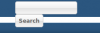


Did you by chance modified the font used on your site? Might explain it, looks somehow a bit bolder the text "search" and then the width of the search area is not enough anymore.
You can paste this in your user.css for now, which should fix it. We simply make the area a bit more width ( play around with the width until it fits )
And if you could post your url ( or PM me ) that would be awesome too, so i can see the problem first hand and not just via a screenshot
You can paste this in your user.css for now, which should fix it. We simply make the area a bit more width ( play around with the width until it fits )
Code:
#search {
    width: 205px;
}
And if you could post your url ( or PM me ) that would be awesome too, so i can see the problem first hand and not just via a screenshot

jedwafu
New Member
I see, very odd. Thanks for the link, ill get someone with linux and teamviewer so i can inspect what is happening on such system
Thank you, I would love to see an update.
Alright, it appears to be a linux "issue". Not exactly an issue, but linux treats sans-serif font type bigger, resulting in a bigger submit button, resulting in to much width for the surounding container, hence breaking the button onto a new line.
Most easy fix, open screen.css and find
replace that with
Removed the backgound image ( old stuff anyway, not anymore used ) and the width of the search area.
Since the input from search itself has a width, it could be safely removed to guarantee different font displays make no issues
Most easy fix, open screen.css and find
Code:
#search {
    background: url("img/searchbg1.png") no-repeat transparent;
    float: right;
    height: 30px;
    margin: -5px 0px 0px;
    padding: 0px;
    text-align: left;
    width: 200px;
}
replace that with
Code:
#search {
    float: right;
    height: 30px;
    margin: -5px 0px 0px;
    padding: 0px;
    text-align: left;
}
Removed the backgound image ( old stuff anyway, not anymore used ) and the width of the search area.
Since the input from search itself has a width, it could be safely removed to guarantee different font displays make no issues
